
CLP label software for Amazon sellers: source to label
Choosing CLP label software for Amazon sellers? Connect the right supplier SDS to your private-label product, language versions and separate ASIN handoff.
Online stores · Kasper Stasiak · Published 16 November 2026 · 4 min read
CLP label software for Amazon sellers should connect the supplier's Safety Data Sheet (SDS) to the private-label product you actually sell, its language versions and the label selected at packing. Use ValidLabels for that recurring label-library and printing job; give the marketplace operator a separate document note for each child ASIN.
Start by resolving the product identity, before copying a supplier PDF into another variant's folder. The worked example below gives you a supplier request and two short handoff notes you can adapt.
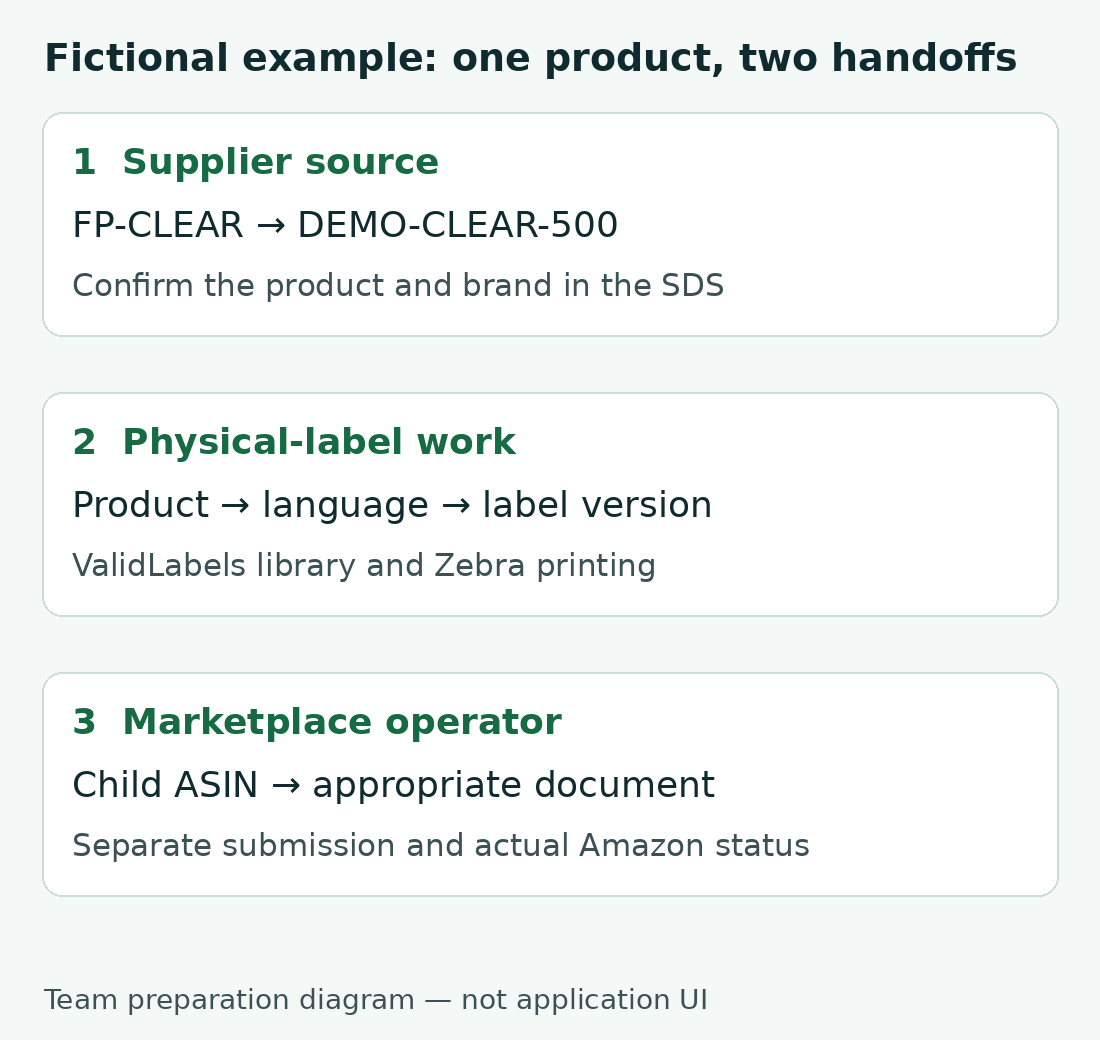
Ask the supplier for the right finished-product document
Get the issuer to resolve a product-name mismatch; renaming the PDF does not change the product identified inside it. Amazon Poland's dangerous-goods FAQ requires the SDS product name and manufacturer or brand to match the listing. Its criteria apply to selling in Poland; check the relevant marketplace's instructions for other countries.
Fictional example: your brand, Example Brand, sells two cleaners:
- Clear Cleaner 500 ml, SKU
DEMO-CLEAR-500, supplier finished productFP-CLEAR. Its SDS names “Supplier Clear Base” instead of the listed product. - Citrus Cleaner 500 ml, SKU
DEMO-CITRUS-500, supplier finished productFP-CITRUS. Its marketplace folder wrongly contains the clear cleaner's SDS.
Use this supplier message as a starting point:
Subject: Correct product identity for our private-label SDSs
We sell your finished product FP-CLEAR as Example Brand Clear Cleaner 500 ml. The SDS received identifies “Supplier Clear Base”. Please confirm the finished product covered and provide the appropriate supplier-issued SDS with the correct product and brand identity, revision and date.
We also sell FP-CITRUS as Example Brand Citrus Cleaner 500 ml. Please provide the appropriate document for that product and confirm its coverage, so we can keep each SKU linked to the right source.
Keep the supplier's response with each issued document. Resolve the clear cleaner's identity with the issuer, and replace the wrong assignment in the citrus folder with the document confirmed for that product. Similar packaging is not a reason to reuse a source.
Give the label team one product and its source
Keep the confirmed SDS with the product's label content and language versions. In ValidLabels for private-label brands, the product library connects these materials; version history keeps the change trail, while barcode lookup and Zebra print on demand support packing.
For the fictional clear cleaner, use this team preparation note. Fill the brackets from your actual records; these are not application field names or an import format:
- Product:
DEMO-CLEAR-500/ Example Brand Clear Cleaner 500 ml. - Source: [supplier-issued SDS filename, revision/date and finished product covered].
- Label: [reviewed label reference and version].
- Languages: [reviewed Polish version]; [reviewed German version], if those are your destinations.
- Packing: [product, language and label version selected for this job].
Give DEMO-CITRUS-500 its own source and label references. If an established supplier document changes later, use the supplier SDS revision guide to track the affected labels and channels. For catalogue-wide identifiers and pack relationships, use the SKU/EAN preparation guide.
Hand over the document for each child ASIN separately
The marketplace operator submits the appropriate document for each child. Amazon Poland's FAQ says a parent-ASIN submission does not cover all children. That is a per-child submission rule, not a rule that every child always needs a different SDS: use the document covering the finished product.
Keep this manual marketplace note separate from the physical-label record:
- Marketplace and child: Amazon Poland / [actual child ASIN].
- Seller product:
DEMO-CLEAR-500/ Example Brand Clear Cleaner 500 ml /FP-CLEAR. - Document: [supplier-issued filename and revision/date].
- Identity comparison: [listing name and brand] against [SDS product name and brand or manufacturer].
- Physical labels: [references for the product's reviewed label versions].
- Submission owner: [marketplace operator].
- Submission and outcome: [file and time actually submitted]; [Amazon case reference and actual status].
Repeat the note for the citrus child using its confirmed product/document relationship. Updating that folder does not itself update the label on the pack. Record the Amazon outcome separately from the reviewed physical-label version.
Choose software for the label work you repeat
If you maintain labels across products and destination languages, evaluate the connection from supplier source to product record, language version and packing output. ValidLabels brings that work into a versioned library with Zebra printing. Keep Amazon document submission with the marketplace operator.
See CLP labels for private-label brands to see how ValidLabels supports your product library and recurring label work.
SDS to label
Your supplier’s SDS in. Your market’s label out.
Upload a safety data sheet (SDS) from any supplier, in any EU language. ValidLabels reads the H and P statements and writes the CLP label for each language you pick, from all 24 official EU languages; standard statements use the official wording. You review it before you save.
More guides
Online stores
WooCommerce CLP: manual fields or a connected widget?
Compare three ways to maintain CLP information on WooCommerce product pages, then test the right variant, language and version before rollout.
14 October 2026
7 min readOnline stores
What CLP information should your product page show?
Selling chemical products online in the EU? Check what CLP information your product pages should show, and how to prepare for the coming rules for online sales.
13 August 2026
8 min readOnline stores
New CLP rules for online stores: what to prepare
New rules for online sales of chemical products are coming, and the EU is finalising the dates. What they mean for your product pages, and what to prepare now.
22 May 2026
9 min read
Would it be a bad idea to try it on one product page?
Upload one product’s safety data sheet (SDS), publish it to your shop and see its hazard information on the product page. The free plan has no card and no time limit.
Kasper Stasiak founded ValidLabels after working directly with European chemical exporters on CLP labelling workflows. ValidLabels is built by Awakast P.S.A., based in Wrocław, Poland.