
In this article
- Capture the supplier revision before changing labels
- Separate the assessment from the shop and warehouse tasks
- Build an impact register by SKU, market and channel
- Check the output buyers and packers actually receive
- Acceptance checklist before the next dispatch
- When a reviewed label library helps
If you sell chemical products online or under your own brand, use each supplier SDS revision to identify which CLP labels, product pages and print jobs need attention. Record the assessment against each affected SKU, language and channel so your team knows what can stay in use and what needs updating.
A new SDS is a trigger for review, not a verdict that every label needs changing. Give each affected output a status: no change, needs review or approved for use.
Capture the supplier revision before changing labels
Keep the previous and new documents together under a single change reference. A filename such as latest-SDS.pdf is not enough to explain which source a label was reviewed against.
Your intake record should contain:
- supplier name and supplier product identifier;
- whether the document covers the finished product you sell or an ingredient used in a formulation;
- new SDS revision number and date, the version it replaces and the date received;
- the previous SDS reference used for the current approved label;
- supplier's explanation of changes and any unresolved questions;
- person responsible for assessment and the next dispatch or publication needing a decision.
Look for revision details on the first page and the change information in Section 16, or elsewhere if the supplier identifies changes there. These locations are described in REACH Annex II, points 0.2.5 and 16, as replaced by Regulation (EU) 2020/878.
If the change summary only says “updated”, ask a useful question: “Which sections changed, why, and does this revision cover the product and stock we are currently selling?” Save the reply with the review. Do not overwrite the older source before that relationship is clear.
Separate the assessment from the shop and warehouse tasks
The person reviewing the product's regulatory information decides what the revision means. Operations turns that decision into a list of outputs to check.
Start the comparison with product identity, the supplier's change explanation and the differences between the documents. For hazard information, Annex II's SDS subsections 2.1 and 2.2 cover classification and label elements. Do not stop at Section 2: a change elsewhere may need specialist assessment even when the visible label text appears unchanged.
There are three useful outcomes:
- No label-content change after assessment. Keep the current approved label reference and record the reason. Other actions, such as checking the SDS download or handling instructions, can still remain open.
- Label-content change identified. Review the affected label versions and the copies of that information used in printing and online channels.
- Impact unresolved. Name the missing information and the owner who will resolve it. Keep the affected output pending rather than marking it approved because the PDF has been uploaded.
A revised ingredient SDS is not a ready-made label for your finished mixture. Route that change to the person assessing the final formulation; do not copy the ingredient's statements onto your branded product.
For the broader distinction between the documents, see SDS versus CLP label: roles and alignment. Here, the job is narrower: deciding which live outputs a particular supplier revision affects.
Build an impact register by SKU, market and channel
Use one row per sale SKU × variant × destination market/language × output channel. A single “Product A updated” checkbox hides too much: the Polish print version can be ready while a German product page is still waiting.
Copy these fields into your register:
- Source: change reference, supplier product identifier, old and new SDS revisions, and scope of the assessed change.
- Sale item: your SKU/EAN, variant, pack size and relevant batch or formulation reference.
- Destination: market and label/content language being checked.
- Output: packaging label, warehouse print route, shop product page or marketplace listing; include the exact file, template, URL or listing ID.
- Version decision: current approved label reference, proposed replacement if needed, and status: no change, needs review or approved for use.
- Owner and evidence: reviewer, person implementing the change, decision date and link to the actual print or online check.
Keep this register in your team’s spreadsheet or change-management system, with a named owner for each output.
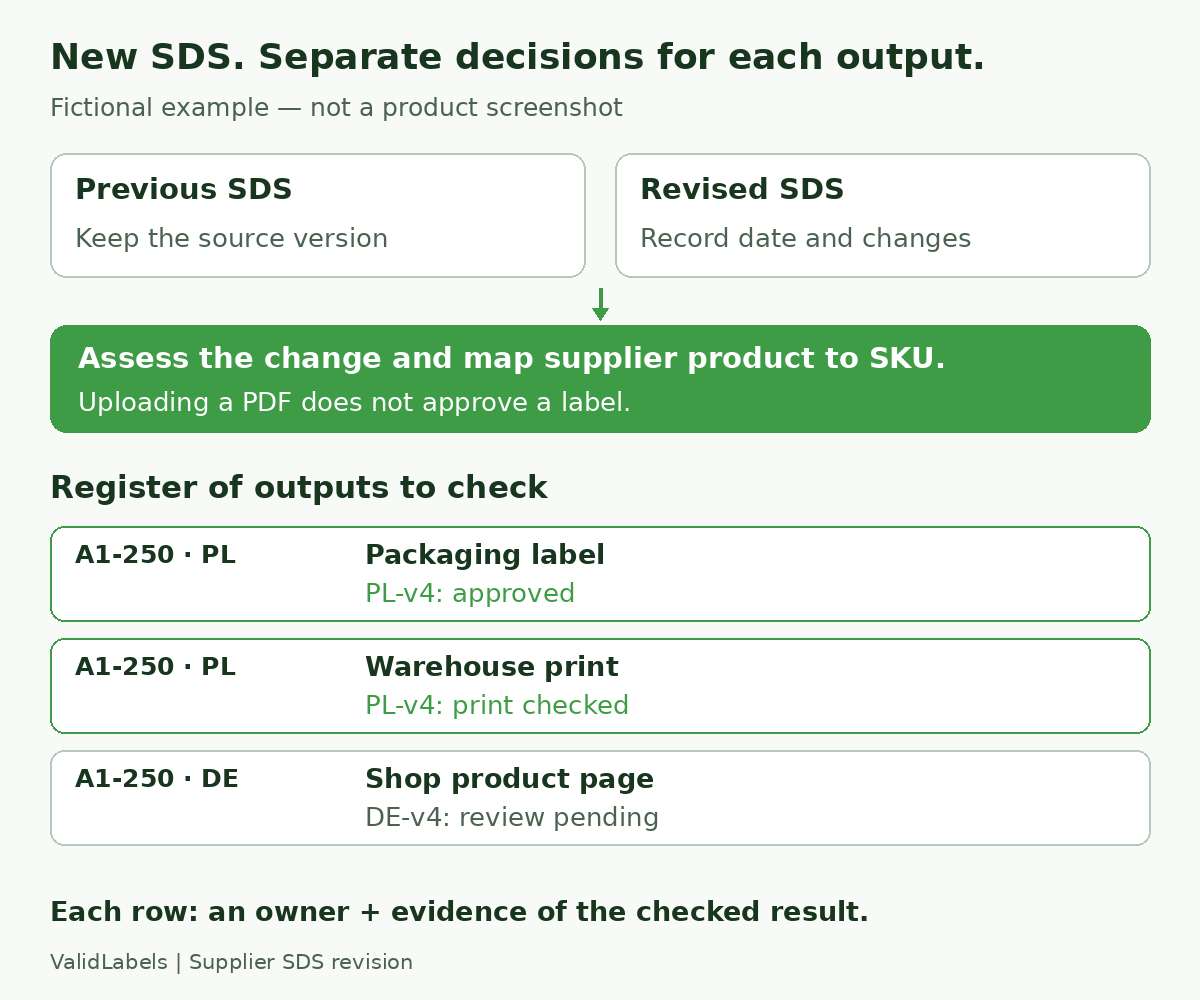 Fictional SDS intake register: retain both source documents, assess the change, then record separate decisions for the packaging label, warehouse print and shop product page.
Worked example: one source, several different decisions
The following is a fictional example, not chemical advice or a customer result. Assume the reviewer has identified a label-content change for supplier finished-product reference FP-A, used for Product A, variant A1, in two pack sizes. Variant A2 uses a different supplier reference, FP-B.
- A1-250 · Poland · Polish · packaging label and print route: split these into separate register rows. Label PL-v4 is approved against the new source; a test print from the packing station matches it. Both rows can be approved once their evidence is saved.
- A1-250 · Germany · German · shop product page: proposed label DE-v4 still awaits language review. The page at its recorded URL continues to show DE-v3. This row stays pending; the completed Polish print check does not close it.
- A1-500 · Poland · Polish · queued print job: the reviewed content is ready, but the queue contains a PDF exported before the change. Record what happens to that job and check the replacement output before approving the row.
- A2-250 · Poland · Polish · marketplace listing: record “not affected by FP-A revision” only after confirming the FP-B source mapping. A shared brand name or similar product photograph is not enough to include or exclude it.
The register now answers a practical question: which exact output is still open, and who can close it? It also helps your team identify unrelated variants before applying a bulk update.
Check the output buyers and packers actually receive
Approval of the content is only part of the handoff. Check its delivery through each route recorded in the register.
At the packing station: look up or scan the SKU using the usual operator process, select the intended destination and inspect a print in the final format. Match the product identifier, language and content to the approved reference. Check readability at the actual label size. Testing an administrator's downloaded PDF does not prove the operator's print route uses that version.
In the shop: open the exact product URL, select the variant and switch to each affected language. Check the displayed hazard information and any separate image, manual text field or downloadable label carrying the old information. Inspect the customer-facing page, not just the editor. For the display itself, use the online product-page checklist.
On other channels: check marketplace listings and distributor copies separately. A connected shop block does not prove that a separately maintained listing or packaging photograph has changed.
In queues and existing stock: identify exported PDFs, cached outputs, pending jobs, preprinted labels and already labelled stock. Ask the responsible reviewer to define the appropriate action and timing for the product and stock concerned. Record that decision; an SDS receipt date alone is not a stock-disposal, sell-through or universal relabelling instruction.
Acceptance checklist before the next dispatch
Use this as the sign-off list for each affected output. If an item is unresolved, keep the owner and next action visible.
- The supplier product and our sale SKU/variant are correctly linked.
- The old and new SDS references are saved, with the assessed differences and decision.
- The decision covers the relevant product, market and stock; any separate regulatory action has an owner.
- The label reference and language are approved, or a documented no-change decision explains why the current version remains in use.
- The normal warehouse lookup produces the intended version; a final-format print has been checked.
- Each affected shop URL, variant and language has been checked as a customer would see it.
- Separate listings, manual fields, downloads and label images have been addressed where affected.
- Old files, queued jobs, preprinted labels and labelled stock have an explicit handling decision.
- The responsible people have signed off their rows, with the version, date and evidence recorded.
Uploading the SDS closes the intake task. It does not, by itself, close the print, storefront or stock decisions.
When a reviewed label library helps
A register can live in a spreadsheet. The case for a shared label library grows when the same reviewed content feeds several languages, packing stations and product pages, and your team has to keep identifying the current version by hand.
ValidLabels supports SDS upload and AI-assisted extraction of H/P statements, label translations, a product library and version history. It also supports barcode-based, on-demand printing with Zebra printers and hazard-information display through a WooCommerce widget or iframe/API for custom shops.
Use those capabilities to assess the handoff from source document to reviewed label and onward to print or shop display. Your team still owns the supplier-to-SKU mapping, the impact decision and the final review. Treat receiving and assessing a supplier revision as explicit work, not something automatically completed when a label platform is connected.
See how ValidLabels handles label content, versions and printing in the product walkthrough, then compare those steps with your affected SKU, market and channel list.
Kasper Stasiak
Founder, ValidLabels
Kasper Stasiak founded ValidLabels after working directly with European chemical exporters on CLP compliance workflows. ValidLabels is built by Awakast P.S.A., based in Wrocław, Poland.
Related articles
E-commerce
WooCommerce CLP: manual fields or a connected widget?
Compare three ways to maintain CLP information on WooCommerce product pages, then test the right variant, language and version before rollout.
CLP Compliance
How to Launch a CLP-Regulated Product in a New EU Market
Expanding a chemical product into another EU country? Learn what to check before launch, from CLP labels and languages to UFI and poison centre notifications.